Skip header to navigation
Notes from building software. The lessons, the gotchas, and the things I wish someone had told me sooner.
Hang on, loading more…
Notes from building software. The lessons, the gotchas, and the things I wish someone had told me sooner.
Hang on, loading more…
I’m currently working on adding an OAuth/OIDC authorization server at work. Claude told me twice, on different occasions, to just implement the OAuth provider from scratch. No library, just raw-dog OAuth and OIDC completely from scratch. It said it would be worth it, because it’s only ~500 LOC.
Read moreEvery few months, software engineering will be over in a few months again. It can’t be, but for reasons you might not expect.
When coming back to work in the beginning of 2026, organizations everywhere were going crazy. So many people, including lots of upper management, had used the winter break to build software with AI and felt that software engineering was over. They had experienced it first-hand. Everything had changed, because look at what they built! Why couldn’t work feel the same?
Their experiences were real, but they happened in isolation. Building software by yourself is orders of magnitude easier than building it in a team, or across multiple teams. The hard problem at work was never just about writing code. Their experiences didn’t reflect the challenges of the organization they worked in.
Read moreThe number of times I still see “Loop Engineering” popping up in any of my feeds is truly upsetting.
The amount of effort you spend on meta-engineering is an illusion of a return on investment that will allow you to build the product better, faster and with greater ease.
It’s the same as building your own framework, or framework-in-a-framework, because you think that all other frameworks out there are slowing down your ability to build the actual product.
Read moreOne idea I’ve internalized while designing APIs is that actions don’t always have to look like actions. Many actions are better off being actual resources.
It feels intuitive and logical to define endpoints like:
It’s straightforward to build, easy for clients to use, and by itself it’s not inherently wrong. But again and again, I’ve noticed its limitations.
Read moreI’m currently working on adding an OAuth/OIDC authorization server at work. Claude told me twice, on different occasions, to just implement the OAuth provider from scratch. No library, just raw-dog OAuth and OIDC completely from scratch. It said it would be worth it, because it’s only ~500 LOC.
Read moreEvery few months, software engineering will be over in a few months again. It can’t be, but for reasons you might not expect.
When coming back to work in the beginning of 2026, organizations everywhere were going crazy. So many people, including lots of upper management, had used the winter break to build software with AI and felt that software engineering was over. They had experienced it first-hand. Everything had changed, because look at what they built! Why couldn’t work feel the same?
Their experiences were real, but they happened in isolation. Building software by yourself is orders of magnitude easier than building it in a team, or across multiple teams. The hard problem at work was never just about writing code. Their experiences didn’t reflect the challenges of the organization they worked in.
Read moreThe number of times I still see “Loop Engineering” popping up in any of my feeds is truly upsetting.
The amount of effort you spend on meta-engineering is an illusion of a return on investment that will allow you to build the product better, faster and with greater ease.
It’s the same as building your own framework, or framework-in-a-framework, because you think that all other frameworks out there are slowing down your ability to build the actual product.
Read moreOne idea I’ve internalized while designing APIs is that actions don’t always have to look like actions. Many actions are better off being actual resources.
It feels intuitive and logical to define endpoints like:
It’s straightforward to build, easy for clients to use, and by itself it’s not inherently wrong. But again and again, I’ve noticed its limitations.
Read moreDo I really need to write an introduction to button components? We all know them. Buttons are one of the most commonly used components in our user interfaces, and are also some of the messiest components, with crappy interfaces and complex implementations for something as simple as a freaking button, and they only get worse as your codebase ages.
In this post, I’ll briefly explain why button components are a classic problem in software engineering, how composition can solve this problem, and how I implement complex buttons with simple code these days.
Read moreLet’s rebuild a paid Cloudflare feature … on Cloudflare, for free.
Vary for images is a Cloudflare CDN feature that caches multiple variants of the same URL, based on the browser’s specific capabilities. It’s a paid feature. I want it, but I didn’t want to pay for it. That’s no issue, because we can rebuild this functionality on Cloudflare completely for free, with just a bit more configuration.
Read moreI’ve just released Storage Buckets on Railway. Right now, you can’t make them public. Some users are rightfully asking why we would only launch with private buckets, and were bummed to see they’re not public. So I wanted to give more insights because I always enjoy these “peeking behind the curtain” stories. I think this stuff is always pretty interesting!
Read moreFor a long time, across different projects throughout my career, I’ve seen database migrations happen during application startup. These migrations usually run as part of a post-deployment hook, just before the new deployment receives any production traffic. But… what’s happening in this short (or sometimes longer) timeframe after the migration is done and before the new app boots, while the old app is still active?
Read moreQuick tip: You can follow GitHub Releases in your feed reader. Just add to the end of the releases URL. For example:
https://github.com/glanceapp/glance/releases
👇
https://github.com/glanceapp/glance/releases.atom
You can do the same with other GitHub resources—like commits, users, tags—if that’s useful to you. But I find the releases feed super handy. Sometimes I just wanna stay in the loop on certain software, like apps, frameworks, major libraries, services, databases.
Whenever the topic of authorization in our Next.js apps came up at Gigs, I had a very strict opinion and rule: we don’t use the middleware for authorization. We can use the middleware for some optimistic UI patterns, like an early redirect when a user is logged out, but never as a means to grant a user access to some data. I’m not saying this because I hate the middleware, or because it’s an easily predictable vulnerability, but because of the way the Next.js middleware sits in an application.
Read moreDo I really need to write an introduction to button components? We all know them. Buttons are one of the most commonly used components in our user interfaces, and are also some of the messiest components, with crappy interfaces and complex implementations for something as simple as a freaking button, and they only get worse as your codebase ages.
In this post, I’ll briefly explain why button components are a classic problem in software engineering, how composition can solve this problem, and how I implement complex buttons with simple code these days.
Read moreLet’s rebuild a paid Cloudflare feature … on Cloudflare, for free.
Vary for images is a Cloudflare CDN feature that caches multiple variants of the same URL, based on the browser’s specific capabilities. It’s a paid feature. I want it, but I didn’t want to pay for it. That’s no issue, because we can rebuild this functionality on Cloudflare completely for free, with just a bit more configuration.
Read moreI’ve just released Storage Buckets on Railway. Right now, you can’t make them public. Some users are rightfully asking why we would only launch with private buckets, and were bummed to see they’re not public. So I wanted to give more insights because I always enjoy these “peeking behind the curtain” stories. I think this stuff is always pretty interesting!
Read moreFor a long time, across different projects throughout my career, I’ve seen database migrations happen during application startup. These migrations usually run as part of a post-deployment hook, just before the new deployment receives any production traffic. But… what’s happening in this short (or sometimes longer) timeframe after the migration is done and before the new app boots, while the old app is still active?
Read moreQuick tip: You can follow GitHub Releases in your feed reader. Just add to the end of the releases URL. For example:
https://github.com/glanceapp/glance/releases
👇
https://github.com/glanceapp/glance/releases.atom
You can do the same with other GitHub resources—like commits, users, tags—if that’s useful to you. But I find the releases feed super handy. Sometimes I just wanna stay in the loop on certain software, like apps, frameworks, major libraries, services, databases.
Whenever the topic of authorization in our Next.js apps came up at Gigs, I had a very strict opinion and rule: we don’t use the middleware for authorization. We can use the middleware for some optimistic UI patterns, like an early redirect when a user is logged out, but never as a means to grant a user access to some data. I’m not saying this because I hate the middleware, or because it’s an easily predictable vulnerability, but because of the way the Next.js middleware sits in an application.
Read moreMy favorite process in software engineering, whether I’m building something new or working on an existing feature, is to first focus purely on the functionality and completely ignore the design. Once everything works, I shift my full attention to making it look and feel great.
I learned this process over a decade ago, and I’ve been recommending it ever since to anyone who’s struggling while building something: struggling with refactors, with design collaboration, with pressure from planning and management, or simply with finding creative direction for the UI.
Read moreMy favorite process in software engineering, whether I’m building something new or working on an existing feature, is to first focus purely on the functionality and completely ignore the design. Once everything works, I shift my full attention to making it look and feel great.
I learned this process over a decade ago, and I’ve been recommending it ever since to anyone who’s struggling while building something: struggling with refactors, with design collaboration, with pressure from planning and management, or simply with finding creative direction for the UI.
Read more.atomI’ve been a zsh user for a long time, though I’ve had a bit of a love-hate relationship with it. It’s cool once you get it configured, but there’s so much to configure, and from time to time things would just break or the shell would get annoyingly slow.
Read morepushState() are weeeiiirdYesterday I learned two weird things that happen when you use pushState() to navigate to a page with a URL fragment:
The CSS :target selector doesn’t work. You can use :target to style an element that is the current URL fragment when doing a full document load, but not with pushState! This is also documented on MDN:
The target element is set at document load and
history.back(), , and method calls. But it is not changed when and methods are called.
But that’s weird! Why not? I would argue that it makes a little bit unusable in modern web applications. Even though it’s such a useful feature!
The event doesn’t fire. Even though the hash changes, the event doesn’t fire. This is also documented on MDN, but oddly enough it’s documented in the docs, and not in the docs.
Note that never causes a event to be fired, even if the new URL differs from the old URL only in its hash.
Update: I did indeed open a small pull request and the hashchange docs now also explain this behavior.
On 22 January, 3 days ago at the time of writing, Tailwind v4.0 was released with some major changes. I decided to upgrade today, and the upgrade path was mixed to be honest!
Read moreThere’s a poster next to my desk with “Only deploy on Fridays” written on it. The poster is visible on Gigs’ Careers page, and from time to time, colleagues and applicants mention it or ask me about it.
Read moreScenario: a magical fairy—the “magical” is important, so you don’t confuse it with a boring non-magical fairy—appears and grants me one wish. What would I wish for?
That JavaScript switches to snake_case over night. We wake up and all the camelCase is gone, replaced by beautiful snake_case.
This isn’t a matter of personal taste. camelCase is simply more difficult to read. It requires more visual effort. There’s even a study on that.
We’re used to reading words that are visually separated, and the underscore provides that visual separation. You probably had no issues reading this sentence, even though it was mostly lowercase letters. But writingLikeThis madeItLikely aBitMoreDifficult toRead, didn’t it?
JavaScript is not a visually appealing language. Perhaps Java and Smalltalk were not the best influences. And with all the new question marks added to its syntax, it looks like a very insecure “mocking spongebob” meme.
And I won’t buy the argument that camelCase is more efficient because you don’t have to type the underscore all the time! It’s as if developers spend their whole day just typing, non-stop, without autocomplete, constantly having to find those keys to press! Aaaaah help, where’s my underscore key gone now, I can’t find it!!!
Nah. snake_case would have been the better choice.
A man can dream though… a man can dream.
When adding dark and light mode to your site, a common approach is to store the theme in localStorage and reading it on the next visit. But our JavaScript usually runs after the page loads, so reading it in JavaScript can cause a flash of the wrong theme—like flashbanging dark mode users with light mode. We can fix this with a small script in the <head>. But wait—isn’t that a blocking script? Aren’t those bad? Let’s take a quick look at why that’s not always true.
I have many thoughts about this topic but I’ll try to keep it short: I don’t like this thought leadership in engineering, where it’s mostly about being an influencer and less about having a good influence.
It rubs me the wrong way. You could just say that it annoys me and I should ignore those parts of the internet. But it actually worries me because it feels like small cult-like groups in which engineers won’t grow: They’re caught in an echo chamber, which makes them feel like they’re growing, but instead of growing as a person and engineer, only a single opinion grows within them.
Read moreI think some apps I use every day, like Spotify for Desktop or YouTube TV, are being way too careless with seemingly small UI changes. It starts to annoy me a lot, so I put together some examples of sloppy and irresponsible UI changes that I noticed in Spotify and YouTube TV to make you think twice before making such careless changes in your apps.
Read moreA short story about a small debugging adventure, entirely within the redis-cli.
I recently discovered that Tailwind’s utility is super useful in web frameworks with nested layouts. I only thought of the utility for smaller UI components, but you actually can use to style any element based on any other element in the DOM.
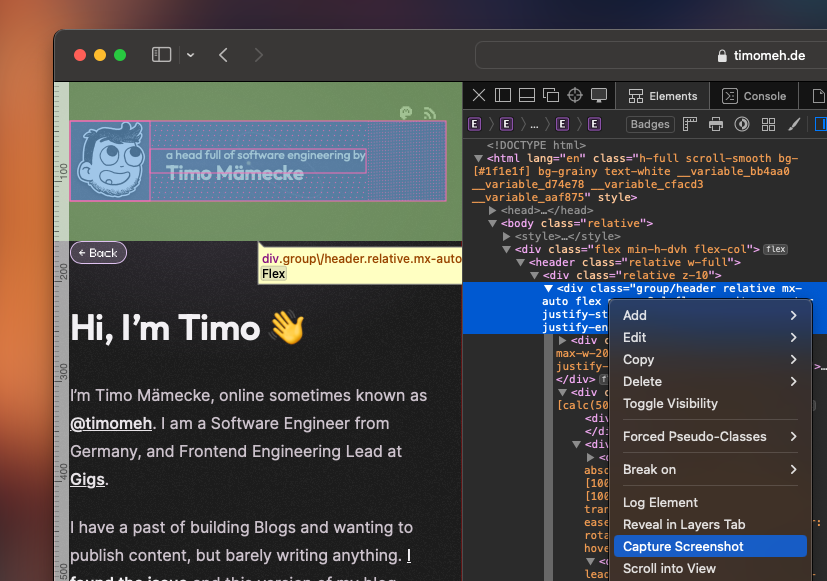
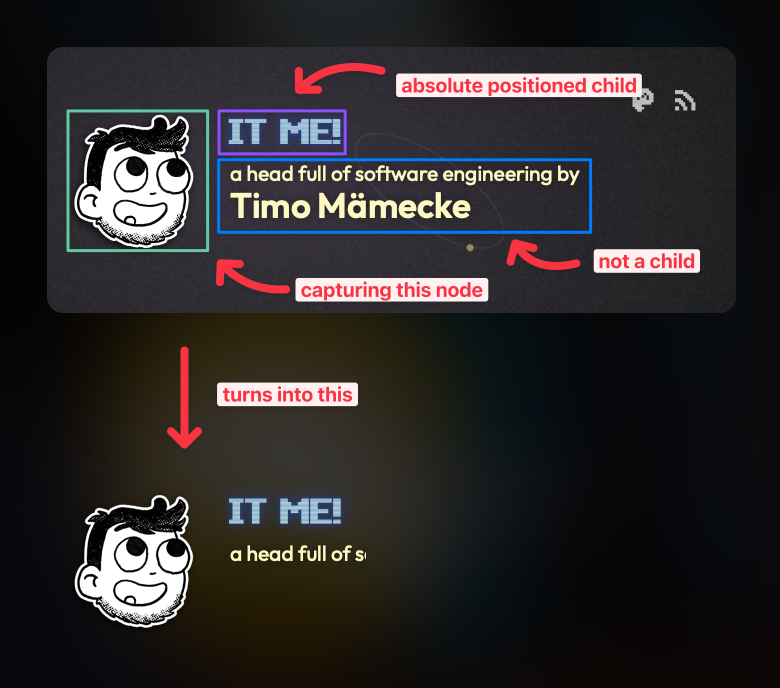
Read moreToday I learned that you can capture a screenshot with transparent background using Safari’s Web Inspector. That’s nice because Chrome’s Dev Tools can’t do it. It will always capture it with the background. Sometimes I just want to quickly paste an HTML element into Figma without recreating it. Now I have at least one reason to open Safari from time to time!
A few interesting things to mention:
I played around with it, and when I remove the from my name, it is in the screenshot. Interesting, but not interesting enough to try to understand it because it’s likely the most useless knowledge out there.
There’s a Christmas song on YouTube that has a special place in my heart. I’ve been listening to it every holiday season since its release in 2011. Music has a way of taking us back to memories, and whenever I hear this song, I’m transported back in time. I used to take for granted that it would always be available to me on YouTube, but that all changed in Christmas 2021.
All of a sudden, the song was nowhere to be found.
Read moreDo you remember when I told you the story how I developed this blog using Next.js, and Incremental Static Regeneration? Well, we’ve got some new features in Next.js, which we’ll explore here. This is the story of migrating to a new very much still experimental feature.
Read moreThere’s a high chance that your file includes a bunch of stuff which doesn’t belong in there. In my opinion, it should only include paths which belong to your software project. For example build artifacts, 3rd party packages, and specifics to the language or runtime of your software.
Read more.atomI’ve been a zsh user for a long time, though I’ve had a bit of a love-hate relationship with it. It’s cool once you get it configured, but there’s so much to configure, and from time to time things would just break or the shell would get annoyingly slow.
Read morepushState() are weeeiiirdYesterday I learned two weird things that happen when you use pushState() to navigate to a page with a URL fragment:
The CSS :target selector doesn’t work. You can use :target to style an element that is the current URL fragment when doing a full document load, but not with pushState! This is also documented on MDN:
The target element is set at document load and
history.back(), , and method calls. But it is not changed when and methods are called.
But that’s weird! Why not? I would argue that it makes a little bit unusable in modern web applications. Even though it’s such a useful feature!
The event doesn’t fire. Even though the hash changes, the event doesn’t fire. This is also documented on MDN, but oddly enough it’s documented in the docs, and not in the docs.
Note that never causes a event to be fired, even if the new URL differs from the old URL only in its hash.
Update: I did indeed open a small pull request and the hashchange docs now also explain this behavior.
On 22 January, 3 days ago at the time of writing, Tailwind v4.0 was released with some major changes. I decided to upgrade today, and the upgrade path was mixed to be honest!
Read moreThere’s a poster next to my desk with “Only deploy on Fridays” written on it. The poster is visible on Gigs’ Careers page, and from time to time, colleagues and applicants mention it or ask me about it.
Read moreScenario: a magical fairy—the “magical” is important, so you don’t confuse it with a boring non-magical fairy—appears and grants me one wish. What would I wish for?
That JavaScript switches to snake_case over night. We wake up and all the camelCase is gone, replaced by beautiful snake_case.
This isn’t a matter of personal taste. camelCase is simply more difficult to read. It requires more visual effort. There’s even a study on that.
We’re used to reading words that are visually separated, and the underscore provides that visual separation. You probably had no issues reading this sentence, even though it was mostly lowercase letters. But writingLikeThis madeItLikely aBitMoreDifficult toRead, didn’t it?
JavaScript is not a visually appealing language. Perhaps Java and Smalltalk were not the best influences. And with all the new question marks added to its syntax, it looks like a very insecure “mocking spongebob” meme.
And I won’t buy the argument that camelCase is more efficient because you don’t have to type the underscore all the time! It’s as if developers spend their whole day just typing, non-stop, without autocomplete, constantly having to find those keys to press! Aaaaah help, where’s my underscore key gone now, I can’t find it!!!
Nah. snake_case would have been the better choice.
A man can dream though… a man can dream.
When adding dark and light mode to your site, a common approach is to store the theme in localStorage and reading it on the next visit. But our JavaScript usually runs after the page loads, so reading it in JavaScript can cause a flash of the wrong theme—like flashbanging dark mode users with light mode. We can fix this with a small script in the <head>. But wait—isn’t that a blocking script? Aren’t those bad? Let’s take a quick look at why that’s not always true.
I have many thoughts about this topic but I’ll try to keep it short: I don’t like this thought leadership in engineering, where it’s mostly about being an influencer and less about having a good influence.
It rubs me the wrong way. You could just say that it annoys me and I should ignore those parts of the internet. But it actually worries me because it feels like small cult-like groups in which engineers won’t grow: They’re caught in an echo chamber, which makes them feel like they’re growing, but instead of growing as a person and engineer, only a single opinion grows within them.
Read moreI think some apps I use every day, like Spotify for Desktop or YouTube TV, are being way too careless with seemingly small UI changes. It starts to annoy me a lot, so I put together some examples of sloppy and irresponsible UI changes that I noticed in Spotify and YouTube TV to make you think twice before making such careless changes in your apps.
Read moreA short story about a small debugging adventure, entirely within the redis-cli.
I recently discovered that Tailwind’s utility is super useful in web frameworks with nested layouts. I only thought of the utility for smaller UI components, but you actually can use to style any element based on any other element in the DOM.
Read moreToday I learned that you can capture a screenshot with transparent background using Safari’s Web Inspector. That’s nice because Chrome’s Dev Tools can’t do it. It will always capture it with the background. Sometimes I just want to quickly paste an HTML element into Figma without recreating it. Now I have at least one reason to open Safari from time to time!
A few interesting things to mention:
I played around with it, and when I remove the from my name, it is in the screenshot. Interesting, but not interesting enough to try to understand it because it’s likely the most useless knowledge out there.
There’s a Christmas song on YouTube that has a special place in my heart. I’ve been listening to it every holiday season since its release in 2011. Music has a way of taking us back to memories, and whenever I hear this song, I’m transported back in time. I used to take for granted that it would always be available to me on YouTube, but that all changed in Christmas 2021.
All of a sudden, the song was nowhere to be found.
Read moreDo you remember when I told you the story how I developed this blog using Next.js, and Incremental Static Regeneration? Well, we’ve got some new features in Next.js, which we’ll explore here. This is the story of migrating to a new very much still experimental feature.
Read moreThere’s a high chance that your file includes a bunch of stuff which doesn’t belong in there. In my opinion, it should only include paths which belong to your software project. For example build artifacts, 3rd party packages, and specifics to the language or runtime of your software.
Read moreThat’s weird! And unexpected. This note should be included in the hashchange docs. Might be a good opportunity to open a small pull request.
history.forward()history.go()history.pushState()history.replaceState():targethashchangepushStatehashchangepushState()hashchangegroupgroupgroupinline-blockgetStaticProps.gitignore.gitignoreA few months ago, an email from my good friend Gerrit showed up in my inbox. Gerrit made a new “Pottoriginale” movie, and he needed a website for his film tour. I knew that it will only take me an evening to do, I had the feeling that I’d enjoy the challenge, and I knew that I have some time in the coming week. And a few days later, pottoriginale.de was live.
Read moreIn programming, we often deal with things being in a state. Users being verified, Modals being open, Posts being published. Yesterday I had an interesting chat with Daniel about rules to decide when you should store state as an enum1 or as a boolean. We both know that it’s always better to use enums instead of booleans. It’s a common advice and nothing new, just search it on the internet and you’ll see countless articles recommending the use of enums.
But how can we tell that a boolean should rather be an enum?
Read moreWhen I published my new site last week, I continued to still see my old site. Initially I thought it was just DNS, but after a short while it dawned on me, that my old site used a Service Worker which cached everything and made it offline available. When you visited my old site, it automatically installed the Service Worker, and continued to serve it from cache. And now, if you visited my new site, it still served my old site. Great.
Read moregit rebase --ontogit rebase --onto is one of my absolute favorite git features. I don’t use it every day, but when I use it, it’s super helpful. For all those situations where you branched off a branch before it got merged, and then you need to rebase your branch onto main without handling dozens of conflicts.
In my last post I covered my decision to use GitHub Discussions as CMS for my posts. I’m going to build it using Next.js, because that’s what I already use a lot, and it has some features which will become quite useful. Let’s get cracking!
Read moreWhen I was a teen, I learned how to build WordPress themes. During holidays or when school was out, I vividly remember how I sometimes sat in front of my computer for a few days and nights, and created new themes for my blog. Of course I had no blog, but having one was a cool thought. But this stuck to me, and I was really never happy with how my blogs work. Until now!
Read moreThat’s weird! And unexpected. This note should be included in the hashchange docs. Might be a good opportunity to open a small pull request.
history.forward()history.go()history.pushState()history.replaceState():targethashchangepushStatehashchangepushState()hashchangegroupgroupgroupinline-blockgetStaticProps.gitignore.gitignoreA few months ago, an email from my good friend Gerrit showed up in my inbox. Gerrit made a new “Pottoriginale” movie, and he needed a website for his film tour. I knew that it will only take me an evening to do, I had the feeling that I’d enjoy the challenge, and I knew that I have some time in the coming week. And a few days later, pottoriginale.de was live.
Read moreIn programming, we often deal with things being in a state. Users being verified, Modals being open, Posts being published. Yesterday I had an interesting chat with Daniel about rules to decide when you should store state as an enum1 or as a boolean. We both know that it’s always better to use enums instead of booleans. It’s a common advice and nothing new, just search it on the internet and you’ll see countless articles recommending the use of enums.
But how can we tell that a boolean should rather be an enum?
Read moreWhen I published my new site last week, I continued to still see my old site. Initially I thought it was just DNS, but after a short while it dawned on me, that my old site used a Service Worker which cached everything and made it offline available. When you visited my old site, it automatically installed the Service Worker, and continued to serve it from cache. And now, if you visited my new site, it still served my old site. Great.
Read moregit rebase --ontogit rebase --onto is one of my absolute favorite git features. I don’t use it every day, but when I use it, it’s super helpful. For all those situations where you branched off a branch before it got merged, and then you need to rebase your branch onto main without handling dozens of conflicts.
In my last post I covered my decision to use GitHub Discussions as CMS for my posts. I’m going to build it using Next.js, because that’s what I already use a lot, and it has some features which will become quite useful. Let’s get cracking!
Read moreWhen I was a teen, I learned how to build WordPress themes. During holidays or when school was out, I vividly remember how I sometimes sat in front of my computer for a few days and nights, and created new themes for my blog. Of course I had no blog, but having one was a cool thought. But this stuck to me, and I was really never happy with how my blogs work. Until now!
Read morePOST /subscriptions/:id/cancel
POST /invoices/:id/pay
POST /subscriptions/:id/cancel
POST /invoices/:id/pay